
Your pickup in 45 seconds
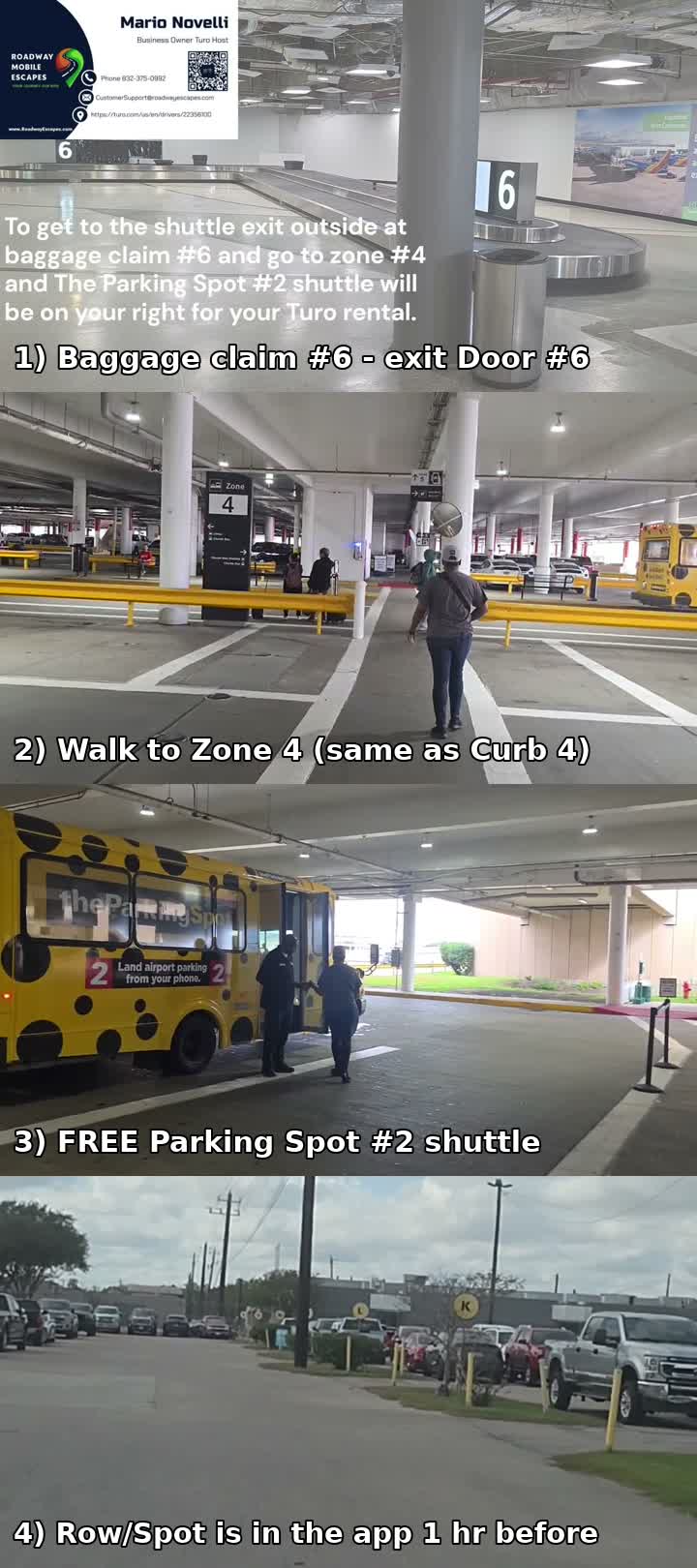
Landing at Houston Hobby (HOU)? This short video shows exactly where to go, from baggage claim to your car.
Pickup in 4 steps
- Exit baggage claim through the last door on the far-right side — Door #6 if it's open; if not, use Door #4. Any exit door works, but that side is the quickest path to the shuttles.
- Walk to Zone 4 (same as Curb 4). The baggage claim exit doors lead outside the airport, so Zone 4 is outdoors — not inside the terminal.
- Take the FREE Parking Spot #2 shuttle to 7601 Airport Blvd. Shuttle questions: 713-641-5993 (24/7).
- Find your car — your Row/Spot shows in the Turo app about an hour before your trip. The lockbox code comes after your driver's license is verified in the app.
Pickup walkthrough video
Check-in / pickup walkthrough
Leaving the lot: the express exit
After you pick up the car, exit under the yellow EXPRESS sign — the tag on the windshield opens the gate automatically, no ticket needed. If the express exit is closed, please tell the attendant the ParkMyShare tag number on the windshield so your exit gets recorded — otherwise we keep getting charged for parking after you've left.
Returning the car
At the return gate: pause and tell the attendant you're returning a Turo / ParkMyShare car and ask for shuttle pickup at Row N. Then park, put the keys in the lockbox, and finish the return check-in with photos in the Turo app.
Fuel: please refuel before drop-off so the car comes back at the same fuel level as pickup.
Smoking: no smoking in the car — smoking violations will be charged ($150).
Good to know
I'm flying into Houston Hobby Airport — where exactly do I pick up?
At The Parking Spot #2, 7601 Airport Blvd, right by Houston Hobby (HOU). Exit baggage claim through the last door on the far-right side — Door #6 if it's open; if not, use Door #4 — then go to Zone 4 (Curb 4), which is outside the airport past the baggage claim doors, and take the free Parking Spot #2 shuttle. Your car's Row/Spot appears in the Turo app about an hour before your trip. Important: Houston has two airports. We serve Houston Hobby (HOU) only — not George Bush Intercontinental (IAH). If you fly into IAH by mistake, you'll need to arrange your own transportation from IAH to Hobby to pick up the car; we don't offer rides between airports.
I'm a local renter — where do I pick up?
Local renters pick up at the Hobby Hilton, 8181 Airport Blvd, instead of the airport. Please note: the free shuttle only serves airport pickups at Parking Spot #2, so for a hotel pickup you'll need your own transportation to get to the hotel.
How do I get the lockbox code?
Verify your driver's license in the Turo app first (upload license + selfie in the app, not in chat). Once verified, we send the lockbox code. Only the primary guest on the reservation can pick up the keys.
How does mileage work?
Your trip includes the mileage shown in your Turo reservation. If your car isn't listed with unlimited mileage, you have two choices: add Unlimited distance for $45 per trip in the Turo app before you go, or just pay the per-mile overage fee shown on your reservation for any miles over. We take odometer and fuel photos at pickup and return on every trip.
What about fuel?
Please return the car at the same fuel level as pickup. In a hurry? Prepaid refuel is $50 per trip — just select it in the app and skip the gas station.
Can I keep the car longer?
Of course — extend in the Turo app before your trip end time (Trips → Manage trip → Change trip) and we'll approve it right away so you stay covered. Please ask as early as you can: our cars are often booked back-to-back, so a last-minute extension may not be possible if the car is reserved for the next guest right after you. And please don't just keep the car: Turo charges for late returns, and an approved extension is always cheaper and safer.
What about airport parking charges?
The Hobby lot charges us for every calendar day the car is parked there. If a late return or a change to your trip adds an extra parking day, that parking cost may be passed on to you through Turo. Returning on time — or extending in the app before your end time — keeps that from happening.
What if the Parking Spot auto express exit is not working?
Exit through the normal exit instead. Please make sure the attendant gets the ParkMyShare tag number, and message us in the Turo app to let us know the auto exit was not working. That helps us make sure the parking exit is recorded correctly.
When I return the car at Parking Spot #2, what do I do at the gate?
Don't just drive in when the gate auto-opens. Please pause and tell the attendant you're returning a Turo / ParkMyShare car and ask for shuttle pickup at Row N in the Turo / ParkMyShare area. Then park the car, put the keys in the lockbox, and complete the return check-in with photos in the Turo app.
What extras can I add?
Child seat $25/trip, portable WiFi $10/trip, prepaid refuel $50/trip. Add them in the Turo app when you book.
Any house rules?
No smoking in the car ($150 fine — Turo verifies with photos), and please return it reasonably clean ($150 for unreasonably dirty). Treat it like your own and we're easy to work with.
My flight is arriving early
Good news travels fast — message us in your Turo trip chat as soon as you know your new arrival time. We'll do our best to have the car ready, but pickup can't start before your booked trip start time and your license verification in the app. If you'll be much earlier, change your trip start in the app (Trips → Manage trip → Change trip) so you're covered from the moment you get in. Turo's liability insurance only covers the booked rental times, so changes have to be made in the app — driving outside your booked trip times isn't covered.
My flight is running late — 2 hours or more
No worries. Message us in your Turo trip chat as soon as you know, and tell us your flight number before you fly so we can follow it. Let us know your new arrival time and we'll have the car ready when you land — the Parking Spot #2 shuttle runs 24/7. If the delay pushes into your trip, remember your return time stays the same unless you extend in the app.
Can I drop the car off somewhere else, like IAH?
Not at this time. Cars have to be returned to the same place you picked up — The Parking Spot #2 at Houston Hobby (HOU) — or the Hobby Hilton for hotel pickups. We don't offer drop-offs at IAH or other locations yet; as we grow with more cars and more help, we hope to add that option.
I need to head home early
That's fine — just message us in the Turo chat first so we can coordinate. Return the car to the same Parking Spot #2 lot, put the keys in the lockbox, and complete the return check-in with photos in the Turo app. Please note Turo doesn't refund unused trip time, so book your return change in the app if your plans change.
What if I get a flat tire or car trouble?
Pull over somewhere safe first. Then message us right away in your Turo trip chat — that's the fastest way to reach us, and our cars have GPS and OnStar for emergencies. If anyone is hurt or you're in danger, call 911 first. Please don't pay for repairs or a tow yourself — let us coordinate it through Turo so it's covered and documented.
What if the check-engine or a warning light comes on?
Turo's policy is clear on this one: pull over safely and stop driving, then contact us in your Turo trip chat and/or Turo support right away. Please don't keep driving on a warning light — pulling over protects you, the car, and your coverage. And never open the hood on a hot engine — let it cool down and wait for help.
Does my own insurance cover me in a Turo car?
Turo includes third-party liability insurance on trips, but liability only covers injury or damage you cause to other people or their property — it does not pay for damage to the Turo car you're driving. Before your trip, check with your insurance company to make sure your policy covers accident damage while driving a peer-to-peer Turo car; some policies cover it and some do not. If yours does not, add a Turo protection plan at checkout.
What happens if I'm in an accident?
First: make sure everyone is safe and call 911 if anyone is hurt. Then contact us in your Turo trip chat and report it in the Turo app right away, with photos. For a wreck or emergency after hours, Turo's live support and roadside assistance are available 24/7 at 1-415-965-4525. For damage to the rental car, what you pay depends on the Turo protection plan you selected: Premier can be $0 for covered exterior damage, Standard up to $500, and Minimum up to $3,000. If you declined protection, or the damage is not covered by your plan, you may be responsible for the full repair cost plus related fees.
How do tolls work?
Tolls are billed through Turo after your trip at the exact toll amount — no markup from us. You'll see them as a separate charge in the app once the trip ends.
Can someone else drive the car?
Only the primary guest on the reservation may drive, or a driver who has been added and approved in Turo. Anyone else behind the wheel is not covered.
How do I know which car is mine?
Check the license plate before you unlock. Your car's plate and Row/Spot appear in the Turo app about an hour before your trip — please make sure the plate matches before getting in.
The lockbox won't open — what do I do?
Stay by the car and message us in the Turo chat. The lockbox code is sent in the app after your license is verified. If the box still won't open, we can unlock the car remotely with OnStar.
The car looks a little dusty
Your car waits in an outdoor lot, so it can pick up light dust while it sits — especially the white one. Good news: you get a free Quick Quack car wash during your trip, with locations all over Texas.
I have a question during my trip
Message us right inside your Turo trip — that's where we answer, and it keeps everything covered by Turo. If it's urgent (car trouble, lockbox won't open), our 24/7 voice assistant can help at 832-281-5936. We're happy to help.
Not every car we have may show up on Turo if it's currently rented or unavailable, so please keep checking back.